
News and Updates
Connecting the Dots: How to improve RAG with Knowledge Graphs
Curiosity
Jul 4, 2024


In this installment of our series on AI for knowledge management, you’ll learn how Knowledge Graphs can improve Retrieval Augmented Generation (RAG) for information retrieval in companies.
Introduction
In AI systems for company knowledge management, Retrieval Augmented Generation (RAG) is a popular architecture to overcome some of the limitations of Large Language Models (LLMs).
However, RAG has limitations, including difficulties in dealing with a mix of structured and unstructured company data. One way to address these limitations is by combining RAG with Knowledge Graphs (KG).
In this post we explain how Graph RAG (GRAG) enhances the traditional RAG approach by using knowledge graphs to deliver more accurate and contextually rich answers.
This is not to be confused with other (complementary) approaches where LLMs are used to extract structured information to build the knowledge graph (also called “Graph RAG”), e.g. in a recent library from Microsoft.
The post is structured in five topics:
Recap: Limitations of LLMs and intro to RAG
Problem: Limitations of traditional RAG
Intermission: What’s a Knowledge Graph?
Solution: Introduction to GRAG
Deep-dive: Understanding the GRAG flow
Impact: The Performance Impact of GRAG
1. Recap: Limitations of LLMs and intro to RAG
Large Language Models (LLMs), like Llama or Gemini, generate text based on extensive training data. Despite their impressive capabilities, LLMs have several limitations for enterprise knowledge retrieval:
No access to private information: LLMs are trained on publicly available data so they lack company-specific, private knowledge.
Hallucinations: Famously, LLMs often produce plausible but entirely false responses known as “hallucinations”.
Static knowledge: LLMs’ knowledge is static and limited to the data included in their most recent training.
That means LLMs are great at generating text, but terrible at knowledge management. Enter Retrieval Augmented Generation (RAG).
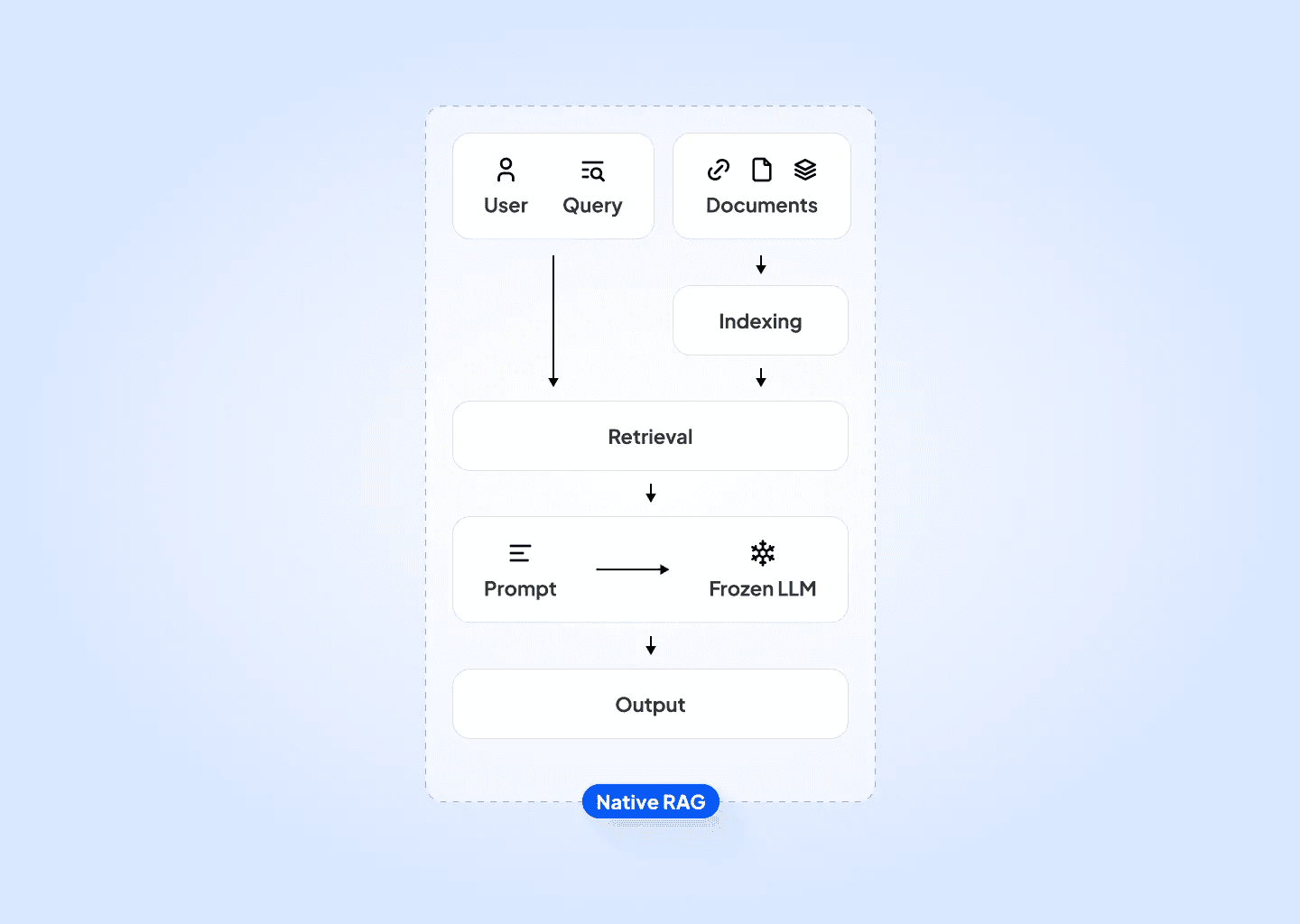
Retrieval Augmented Generation (RAG) is an AI architecture that enhances LLMs with external data sources. It works in two steps:
Retrieval: Use the user query to retrieve related information (“context”) from a database, e.g. a company knowledge repository.
Generation: Instruct the LLM to answer the user query based on the retrieved context.
By giving the LLM the context as a reference, RAG addresses the limitations mentioned earlier. For more background on how basic RAG works and how it works with LLMs, check out our previous introductory post or this detailed summary from AppliedAI.
2. Motivation: Limitations of RAG
Despite its advantages and popularity, RAG still has limitations when applied to knowledge management. These limitations are related to context retrieval on specific company data:
Poor retrieval with generic models: Retrieval models (embedding encoders) are typically trained on internet data, so they can struggle to find the correct context in domain-specific company knowledge.
Handling of Typos vs. Non-Typos: Embedding encoders are often tolerant of typos. This is helpful for general queries (e.g., searching “curiosty” vs. “curiosity”), but can be problematic for context-specific queries, e.g., “Airbus A320” vs. “Airbus A330”.
Feeding incorrect context to the LLM can contaminate answers with mistakes or invented facts. Providing seemingly plausible answers with incorrect information can erode user confidence in systems or — even worse — lead to mistakes in the real world.
Some of these problems can be fixed with prompt templates that instruct the LLM to ignore irrelevant information, but that only goes so far towards improving results.
Knowledge Graph RAG (GRAG) is an exciting way of addressing these limitations for company data.
Intermission: What is a Knowledge Graph?
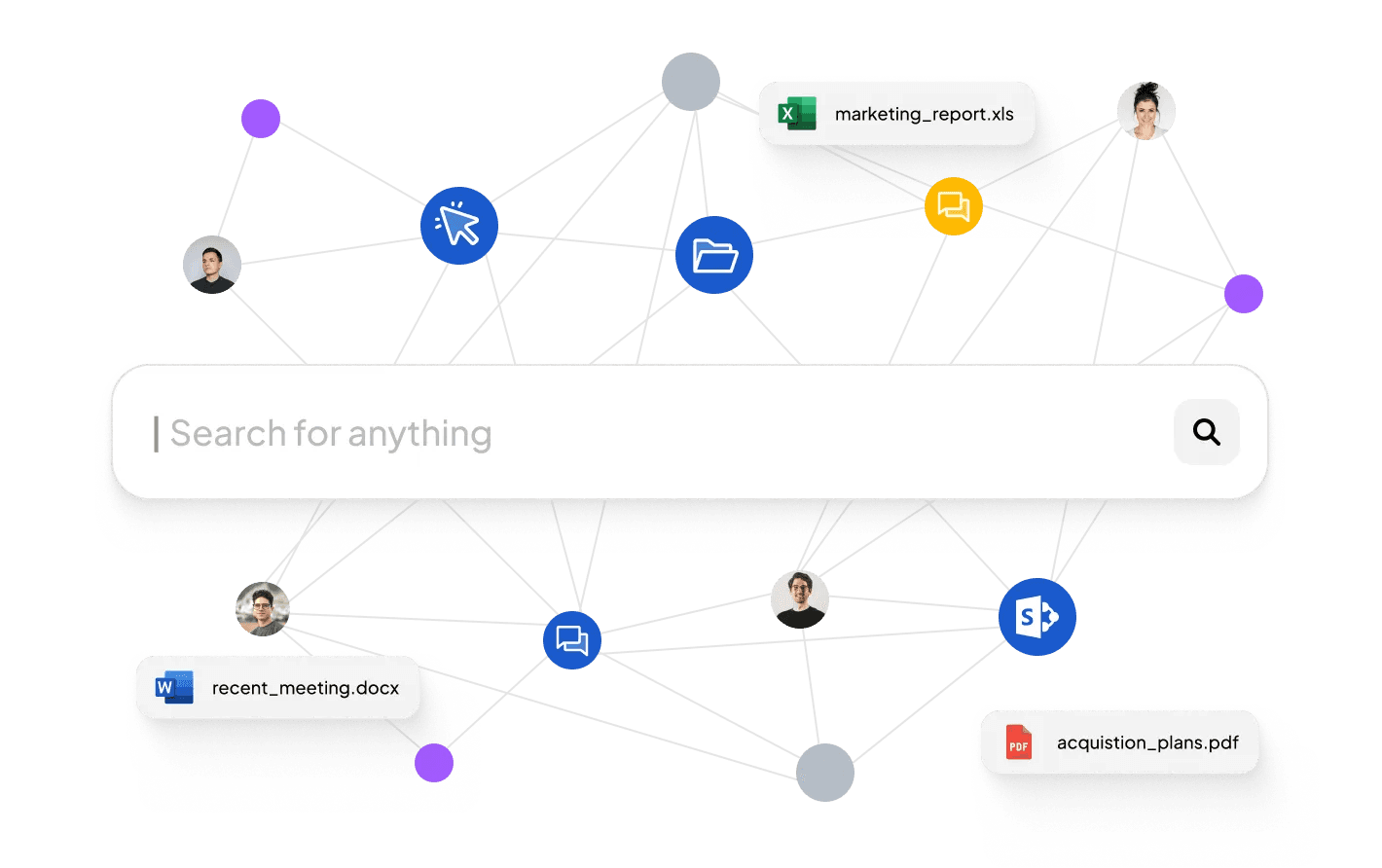
A knowledge graph is a representation of information that includes entities and the relationships between them. The information is usually stored in a graph database like Neo4J or Curiosity, with two main components:
Nodes: These represent entities like objects, files, or people. For example, a node could be a company (Curiosity) or a location (Munich).
Edges: These define the relationships between nodes. For example, an edge might indicate that Curiosity is-located-in Munich.
Depending on the type of graph database, nodes and edges can also have properties.
Solution: Introduction to Graph RAG
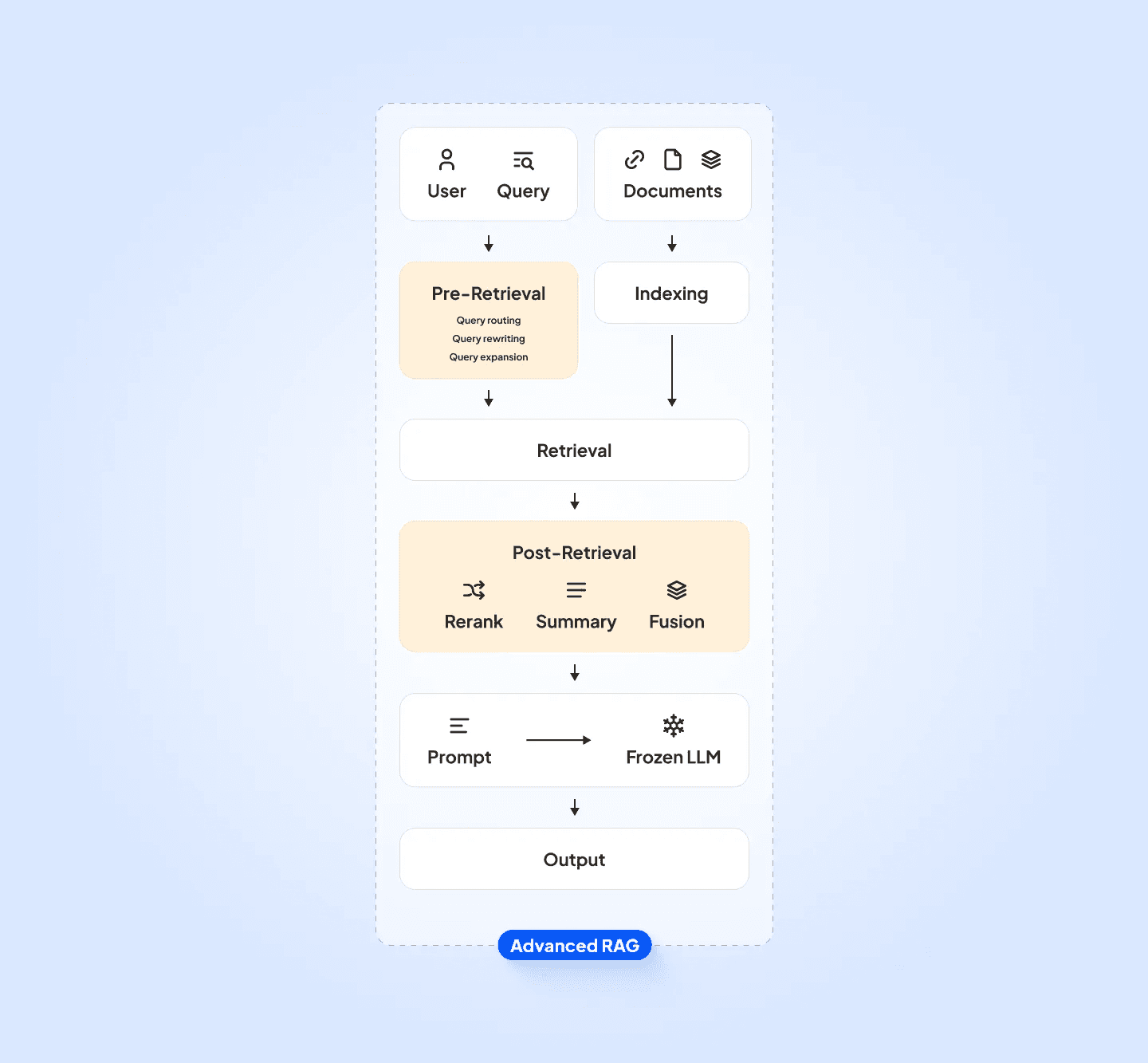
Graph RAG (GRAG) uses knowledge graphs to improve RAG performance for knowledge retrieval. It works by enhancing retrieval with the structured and linked information stored in the graph, and it’s increasingly popular (e.g. here).
GRAG works by adding steps to the standard RAG flow. It uses the information in the graph to augment how results are retrieved and filtered before sending them as context to an LLM for generating the answer.

There are three main ways GRAG enhances standard RAG:
It allows you to use entities (e.g., part numbers, process references, etc.) captured in documents to compute graph embeddings in addition to document embeddings. These represent meaningful connections in the data and help filter out noise from long documents.
It lets you filter results based on the user context (e.g. department) and entities captured in their query.
It lets you boost/demote results based on context and captured entities.
The combination of these techniques helps retrieve the best context for the LLM to answer questions accurately, and take structured information into account.
Deep-Dive: Understanding the GRAG flow
Digging a level deeper, the following section gives you a quick overview of how to build a GRAG flow.
Step 1: Preprocess Data and Build the Knowledge Graph (index time)
Preprocess unstructured text data (incl. chunking) and add it to the graph, using named entity recognition (NER) to extract entities, references, and relationships.
Add structured data to the knowledge graph (e.g., machine references).
Connect structured data, texts, and captured entities to the knowledge graph, creating a representation of the connections between any given document and the other data in the graph.
Train document embedding models on the unstructured text.
Train graph embedding models on the structure of the objects connected to text in the graph, e.g., using the OSS library Catalyst
Step 2: Process the User Question (query time)
When a user submits a question, analyze it to identify key entities and references (e.g. machine reference and time period) to filter candidate documents).
Encode the question text using the document embedding models.
Encode the connections to objects connected to the document using graph embedding models.
Step 3: Retrieve and Filter Context (query time)
Combine graph and document embeddings to find the best candidate results (aka “vector search”), e.g., using the OSS library HNSW.
Filter candidate results using the graph structure, e.g. with user context and entities captured from the query.
Further refine candidate results by boosting or demoting them based on connections in the graph.
Step 4: Generate the Answer (query time)
Provide the user query to the LLM and instruct it to answer based on context provided by the top results (chunks).
Return the response to user, including references to results (“sources”) for additional transparency and trustworthiness..
Impact: The Impact of GRAG
It sounds like a lot of work to set up a knowledge graph, extract entities, train more models, and add boosting logic. So is it really worth it?
From our perspective, the answer is a resounding “Yes!”. For one thing, our tightly integrated solution Curiosity lets us get from documents to a full GRAG solution in a couple of days.
More importantly, however, the quality of the context provided to the LLM is significantly improved due to the preprocessing and filtering steps, which in turn improves the quality of responses.
In a project in 2023, we measured the impact of GRAG compared to naive RAG on a large set of proprietary technical documents.
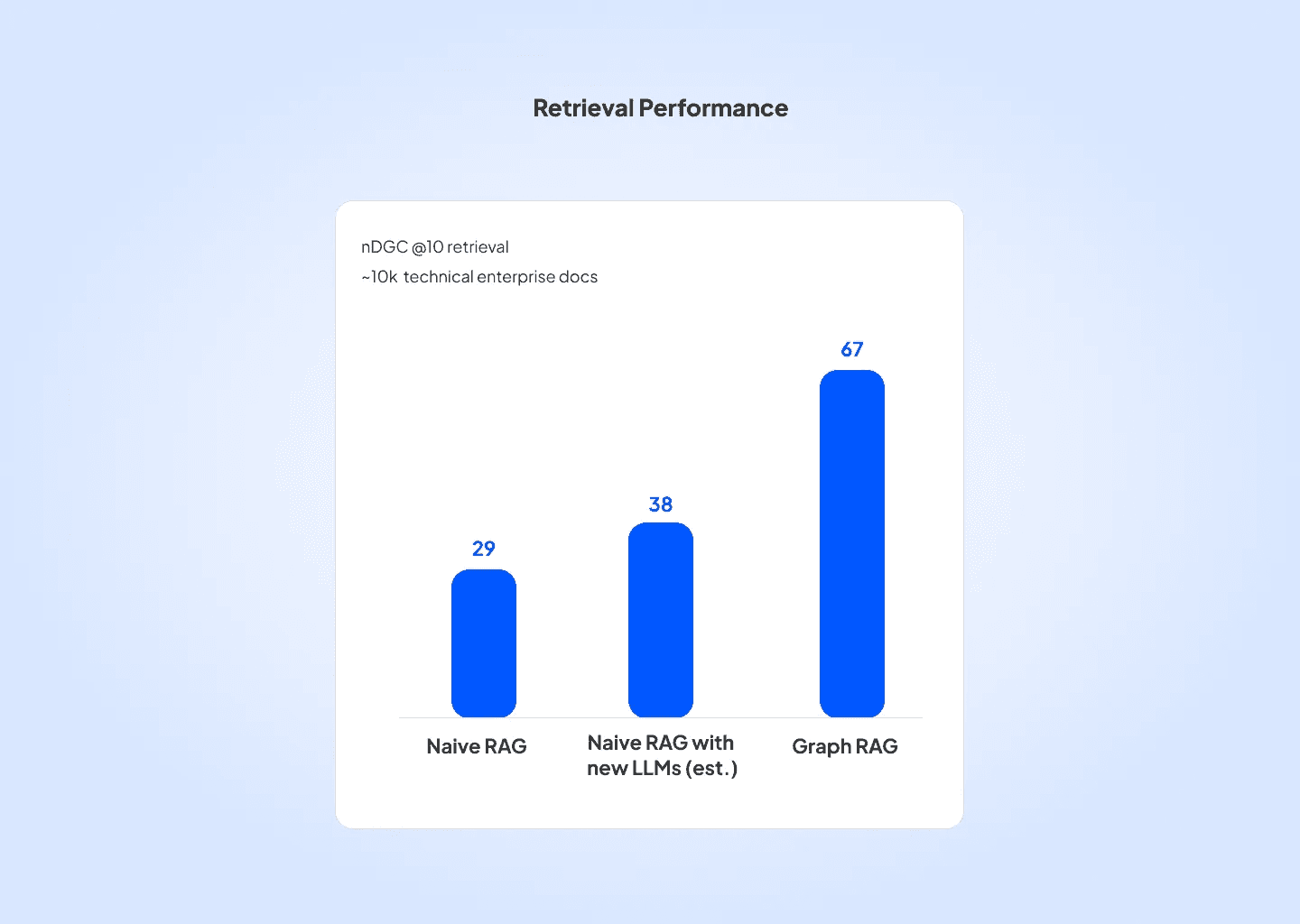
We measured performance using the NDCG score (Normalized Discounted Cumulative Gain), which evaluates performance of ranked retrieval systems by checking the relevance of the ordered list of items they return.
The impact of using the graph for retrieval was profound: For top 10 docs the native RAG system had an NDGC score of 29. Estimating the impact of LLM updates we estimated a potential increase to 38. However, with Graph RAG the NDGC score jumped to 67.
The improvement from using the graph was confirmed in testing with expert users, suggesting that GRAG was the correct choice — at least for this application.
Summary
In sum, GRAG enhances the traditional RAG model by incorporating pre-processing and the structure in a knowledge graph. That helps take into account complex relationships in enterprise data, which improves document retrieval and context quality. The improved context helps the LLM to generate more accurate and contextually rich answers.
At Curiosity, we plan to continue using and refining GRAG and we’re excited about the possibilities it unlocks for enterprise knowledge management. We’re also interested in how GRAG can be complemented by using LLMs to build the knowledge graph, bringing the interaction between LLMs and graph databases full circle.
Reach out if you’re interested in learning more about how Curiosity can help with your enterprise knowledge.
If you enjoyed this article, you might want to check out:
In this installment of our series on AI for knowledge management, you’ll learn how Knowledge Graphs can improve Retrieval Augmented Generation (RAG) for information retrieval in companies.

Introduction
In AI systems for company knowledge management, Retrieval Augmented Generation (RAG) is a popular architecture to overcome some of the limitations of Large Language Models (LLMs).
However, RAG has limitations, including difficulties in dealing with a mix of structured and unstructured company data. One way to address these limitations is by combining RAG with Knowledge Graphs (KG).
In this post we explain how Graph RAG (GRAG) enhances the traditional RAG approach by using knowledge graphs to deliver more accurate and contextually rich answers.
This is not to be confused with other (complementary) approaches where LLMs are used to extract structured information to build the knowledge graph (also called “Graph RAG”), e.g. in a recent library from Microsoft.
The post is structured in five topics:
Recap: Limitations of LLMs and intro to RAG
Problem: Limitations of traditional RAG
Intermission: What’s a Knowledge Graph?
Solution: Introduction to GRAG
Deep-dive: Understanding the GRAG flow
Impact: The Performance Impact of GRAG
1. Recap: Limitations of LLMs and intro to RAG
Large Language Models (LLMs), like Llama or Gemini, generate text based on extensive training data. Despite their impressive capabilities, LLMs have several limitations for enterprise knowledge retrieval:
No access to private information: LLMs are trained on publicly available data so they lack company-specific, private knowledge.
Hallucinations: Famously, LLMs often produce plausible but entirely false responses known as “hallucinations”.
Static knowledge: LLMs’ knowledge is static and limited to the data included in their most recent training.
That means LLMs are great at generating text, but terrible at knowledge management. Enter Retrieval Augmented Generation (RAG).

Retrieval Augmented Generation (RAG) is an AI architecture that enhances LLMs with external data sources. It works in two steps:
Retrieval: Use the user query to retrieve related information (“context”) from a database, e.g. a company knowledge repository.
Generation: Instruct the LLM to answer the user query based on the retrieved context.
By giving the LLM the context as a reference, RAG addresses the limitations mentioned earlier. For more background on how basic RAG works and how it works with LLMs, check out our previous introductory post or this detailed summary from AppliedAI.
2. Motivation: Limitations of RAG
Despite its advantages and popularity, RAG still has limitations when applied to knowledge management. These limitations are related to context retrieval on specific company data:
Poor retrieval with generic models: Retrieval models (embedding encoders) are typically trained on internet data, so they can struggle to find the correct context in domain-specific company knowledge.
Handling of Typos vs. Non-Typos: Embedding encoders are often tolerant of typos. This is helpful for general queries (e.g., searching “curiosty” vs. “curiosity”), but can be problematic for context-specific queries, e.g., “Airbus A320” vs. “Airbus A330”.
Feeding incorrect context to the LLM can contaminate answers with mistakes or invented facts. Providing seemingly plausible answers with incorrect information can erode user confidence in systems or — even worse — lead to mistakes in the real world.
Some of these problems can be fixed with prompt templates that instruct the LLM to ignore irrelevant information, but that only goes so far towards improving results.
Knowledge Graph RAG (GRAG) is an exciting way of addressing these limitations for company data.
Intermission: What is a Knowledge Graph?
A knowledge graph is a representation of information that includes entities and the relationships between them. The information is usually stored in a graph database like Neo4J or Curiosity, with two main components:
Nodes: These represent entities like objects, files, or people. For example, a node could be a company (Curiosity) or a location (Munich).
Edges: These define the relationships between nodes. For example, an edge might indicate that Curiosity is-located-in Munich.
Depending on the type of graph database, nodes and edges can also have properties.

Solution: Introduction to Graph RAG
Graph RAG (GRAG) uses knowledge graphs to improve RAG performance for knowledge retrieval. It works by enhancing retrieval with the structured and linked information stored in the graph, and it’s increasingly popular (e.g. here).
GRAG works by adding steps to the standard RAG flow. It uses the information in the graph to augment how results are retrieved and filtered before sending them as context to an LLM for generating the answer.

There are three main ways GRAG enhances standard RAG:
It allows you to use entities (e.g., part numbers, process references, etc.) captured in documents to compute graph embeddings in addition to document embeddings. These represent meaningful connections in the data and help filter out noise from long documents.
It lets you filter results based on the user context (e.g. department) and entities captured in their query.
It lets you boost/demote results based on context and captured entities.
The combination of these techniques helps retrieve the best context for the LLM to answer questions accurately, and take structured information into account.
Deep-Dive: Understanding the GRAG flow
Digging a level deeper, the following section gives you a quick overview of how to build a GRAG flow.
Step 1: Preprocess Data and Build the Knowledge Graph (index time)
Preprocess unstructured text data (incl. chunking) and add it to the graph, using named entity recognition (NER) to extract entities, references, and relationships.
Add structured data to the knowledge graph (e.g., machine references).
Connect structured data, texts, and captured entities to the knowledge graph, creating a representation of the connections between any given document and the other data in the graph.
Train document embedding models on the unstructured text.
Train graph embedding models on the structure of the objects connected to text in the graph, e.g., using the OSS library Catalyst
Step 2: Process the User Question (query time)
When a user submits a question, analyze it to identify key entities and references (e.g. machine reference and time period) to filter candidate documents).
Encode the question text using the document embedding models.
Encode the connections to objects connected to the document using graph embedding models.
Step 3: Retrieve and Filter Context (query time)
Combine graph and document embeddings to find the best candidate results (aka “vector search”), e.g., using the OSS library HNSW.
Filter candidate results using the graph structure, e.g. with user context and entities captured from the query.
Further refine candidate results by boosting or demoting them based on connections in the graph.
Step 4: Generate the Answer (query time)
Provide the user query to the LLM and instruct it to answer based on context provided by the top results (chunks).
Return the response to user, including references to results (“sources”) for additional transparency and trustworthiness..
Impact: The Impact of GRAG
It sounds like a lot of work to set up a knowledge graph, extract entities, train more models, and add boosting logic. So is it really worth it?
From our perspective, the answer is a resounding “Yes!”. For one thing, our tightly integrated solution Curiosity lets us get from documents to a full GRAG solution in a couple of days.
More importantly, however, the quality of the context provided to the LLM is significantly improved due to the preprocessing and filtering steps, which in turn improves the quality of responses.
In a project in 2023, we measured the impact of GRAG compared to naive RAG on a large set of proprietary technical documents.

We measured performance using the NDCG score (Normalized Discounted Cumulative Gain), which evaluates performance of ranked retrieval systems by checking the relevance of the ordered list of items they return.
The impact of using the graph for retrieval was profound: For top 10 docs the native RAG system had an NDGC score of 29. Estimating the impact of LLM updates we estimated a potential increase to 38. However, with Graph RAG the NDGC score jumped to 67.
The improvement from using the graph was confirmed in testing with expert users, suggesting that GRAG was the correct choice — at least for this application.
Summary
In sum, GRAG enhances the traditional RAG model by incorporating pre-processing and the structure in a knowledge graph. That helps take into account complex relationships in enterprise data, which improves document retrieval and context quality. The improved context helps the LLM to generate more accurate and contextually rich answers.
At Curiosity, we plan to continue using and refining GRAG and we’re excited about the possibilities it unlocks for enterprise knowledge management. We’re also interested in how GRAG can be complemented by using LLMs to build the knowledge graph, bringing the interaction between LLMs and graph databases full circle.
Reach out if you’re interested in learning more about how Curiosity can help with your enterprise knowledge.
If you enjoyed this article, you might want to check out:
In this installment of our series on AI for knowledge management, you’ll learn how Knowledge Graphs can improve Retrieval Augmented Generation (RAG) for information retrieval in companies.

Introduction
In AI systems for company knowledge management, Retrieval Augmented Generation (RAG) is a popular architecture to overcome some of the limitations of Large Language Models (LLMs).
However, RAG has limitations, including difficulties in dealing with a mix of structured and unstructured company data. One way to address these limitations is by combining RAG with Knowledge Graphs (KG).
In this post we explain how Graph RAG (GRAG) enhances the traditional RAG approach by using knowledge graphs to deliver more accurate and contextually rich answers.
This is not to be confused with other (complementary) approaches where LLMs are used to extract structured information to build the knowledge graph (also called “Graph RAG”), e.g. in a recent library from Microsoft.
The post is structured in five topics:
Recap: Limitations of LLMs and intro to RAG
Problem: Limitations of traditional RAG
Intermission: What’s a Knowledge Graph?
Solution: Introduction to GRAG
Deep-dive: Understanding the GRAG flow
Impact: The Performance Impact of GRAG
1. Recap: Limitations of LLMs and intro to RAG
Large Language Models (LLMs), like Llama or Gemini, generate text based on extensive training data. Despite their impressive capabilities, LLMs have several limitations for enterprise knowledge retrieval:
No access to private information: LLMs are trained on publicly available data so they lack company-specific, private knowledge.
Hallucinations: Famously, LLMs often produce plausible but entirely false responses known as “hallucinations”.
Static knowledge: LLMs’ knowledge is static and limited to the data included in their most recent training.
That means LLMs are great at generating text, but terrible at knowledge management. Enter Retrieval Augmented Generation (RAG).

Retrieval Augmented Generation (RAG) is an AI architecture that enhances LLMs with external data sources. It works in two steps:
Retrieval: Use the user query to retrieve related information (“context”) from a database, e.g. a company knowledge repository.
Generation: Instruct the LLM to answer the user query based on the retrieved context.
By giving the LLM the context as a reference, RAG addresses the limitations mentioned earlier. For more background on how basic RAG works and how it works with LLMs, check out our previous introductory post or this detailed summary from AppliedAI.
2. Motivation: Limitations of RAG
Despite its advantages and popularity, RAG still has limitations when applied to knowledge management. These limitations are related to context retrieval on specific company data:
Poor retrieval with generic models: Retrieval models (embedding encoders) are typically trained on internet data, so they can struggle to find the correct context in domain-specific company knowledge.
Handling of Typos vs. Non-Typos: Embedding encoders are often tolerant of typos. This is helpful for general queries (e.g., searching “curiosty” vs. “curiosity”), but can be problematic for context-specific queries, e.g., “Airbus A320” vs. “Airbus A330”.
Feeding incorrect context to the LLM can contaminate answers with mistakes or invented facts. Providing seemingly plausible answers with incorrect information can erode user confidence in systems or — even worse — lead to mistakes in the real world.
Some of these problems can be fixed with prompt templates that instruct the LLM to ignore irrelevant information, but that only goes so far towards improving results.
Knowledge Graph RAG (GRAG) is an exciting way of addressing these limitations for company data.
Intermission: What is a Knowledge Graph?
A knowledge graph is a representation of information that includes entities and the relationships between them. The information is usually stored in a graph database like Neo4J or Curiosity, with two main components:
Nodes: These represent entities like objects, files, or people. For example, a node could be a company (Curiosity) or a location (Munich).
Edges: These define the relationships between nodes. For example, an edge might indicate that Curiosity is-located-in Munich.
Depending on the type of graph database, nodes and edges can also have properties.

Solution: Introduction to Graph RAG
Graph RAG (GRAG) uses knowledge graphs to improve RAG performance for knowledge retrieval. It works by enhancing retrieval with the structured and linked information stored in the graph, and it’s increasingly popular (e.g. here).
GRAG works by adding steps to the standard RAG flow. It uses the information in the graph to augment how results are retrieved and filtered before sending them as context to an LLM for generating the answer.

There are three main ways GRAG enhances standard RAG:
It allows you to use entities (e.g., part numbers, process references, etc.) captured in documents to compute graph embeddings in addition to document embeddings. These represent meaningful connections in the data and help filter out noise from long documents.
It lets you filter results based on the user context (e.g. department) and entities captured in their query.
It lets you boost/demote results based on context and captured entities.
The combination of these techniques helps retrieve the best context for the LLM to answer questions accurately, and take structured information into account.
Deep-Dive: Understanding the GRAG flow
Digging a level deeper, the following section gives you a quick overview of how to build a GRAG flow.
Step 1: Preprocess Data and Build the Knowledge Graph (index time)
Preprocess unstructured text data (incl. chunking) and add it to the graph, using named entity recognition (NER) to extract entities, references, and relationships.
Add structured data to the knowledge graph (e.g., machine references).
Connect structured data, texts, and captured entities to the knowledge graph, creating a representation of the connections between any given document and the other data in the graph.
Train document embedding models on the unstructured text.
Train graph embedding models on the structure of the objects connected to text in the graph, e.g., using the OSS library Catalyst
Step 2: Process the User Question (query time)
When a user submits a question, analyze it to identify key entities and references (e.g. machine reference and time period) to filter candidate documents).
Encode the question text using the document embedding models.
Encode the connections to objects connected to the document using graph embedding models.
Step 3: Retrieve and Filter Context (query time)
Combine graph and document embeddings to find the best candidate results (aka “vector search”), e.g., using the OSS library HNSW.
Filter candidate results using the graph structure, e.g. with user context and entities captured from the query.
Further refine candidate results by boosting or demoting them based on connections in the graph.
Step 4: Generate the Answer (query time)
Provide the user query to the LLM and instruct it to answer based on context provided by the top results (chunks).
Return the response to user, including references to results (“sources”) for additional transparency and trustworthiness..
Impact: The Impact of GRAG
It sounds like a lot of work to set up a knowledge graph, extract entities, train more models, and add boosting logic. So is it really worth it?
From our perspective, the answer is a resounding “Yes!”. For one thing, our tightly integrated solution Curiosity lets us get from documents to a full GRAG solution in a couple of days.
More importantly, however, the quality of the context provided to the LLM is significantly improved due to the preprocessing and filtering steps, which in turn improves the quality of responses.
In a project in 2023, we measured the impact of GRAG compared to naive RAG on a large set of proprietary technical documents.

We measured performance using the NDCG score (Normalized Discounted Cumulative Gain), which evaluates performance of ranked retrieval systems by checking the relevance of the ordered list of items they return.
The impact of using the graph for retrieval was profound: For top 10 docs the native RAG system had an NDGC score of 29. Estimating the impact of LLM updates we estimated a potential increase to 38. However, with Graph RAG the NDGC score jumped to 67.
The improvement from using the graph was confirmed in testing with expert users, suggesting that GRAG was the correct choice — at least for this application.
Summary
In sum, GRAG enhances the traditional RAG model by incorporating pre-processing and the structure in a knowledge graph. That helps take into account complex relationships in enterprise data, which improves document retrieval and context quality. The improved context helps the LLM to generate more accurate and contextually rich answers.
At Curiosity, we plan to continue using and refining GRAG and we’re excited about the possibilities it unlocks for enterprise knowledge management. We’re also interested in how GRAG can be complemented by using LLMs to build the knowledge graph, bringing the interaction between LLMs and graph databases full circle.
Reach out if you’re interested in learning more about how Curiosity can help with your enterprise knowledge.
If you enjoyed this article, you might want to check out:
In this installment of our series on AI for knowledge management, you’ll learn how Knowledge Graphs can improve Retrieval Augmented Generation (RAG) for information retrieval in companies.

Introduction
In AI systems for company knowledge management, Retrieval Augmented Generation (RAG) is a popular architecture to overcome some of the limitations of Large Language Models (LLMs).
However, RAG has limitations, including difficulties in dealing with a mix of structured and unstructured company data. One way to address these limitations is by combining RAG with Knowledge Graphs (KG).
In this post we explain how Graph RAG (GRAG) enhances the traditional RAG approach by using knowledge graphs to deliver more accurate and contextually rich answers.
This is not to be confused with other (complementary) approaches where LLMs are used to extract structured information to build the knowledge graph (also called “Graph RAG”), e.g. in a recent library from Microsoft.
The post is structured in five topics:
Recap: Limitations of LLMs and intro to RAG
Problem: Limitations of traditional RAG
Intermission: What’s a Knowledge Graph?
Solution: Introduction to GRAG
Deep-dive: Understanding the GRAG flow
Impact: The Performance Impact of GRAG
1. Recap: Limitations of LLMs and intro to RAG
Large Language Models (LLMs), like Llama or Gemini, generate text based on extensive training data. Despite their impressive capabilities, LLMs have several limitations for enterprise knowledge retrieval:
No access to private information: LLMs are trained on publicly available data so they lack company-specific, private knowledge.
Hallucinations: Famously, LLMs often produce plausible but entirely false responses known as “hallucinations”.
Static knowledge: LLMs’ knowledge is static and limited to the data included in their most recent training.
That means LLMs are great at generating text, but terrible at knowledge management. Enter Retrieval Augmented Generation (RAG).

Retrieval Augmented Generation (RAG) is an AI architecture that enhances LLMs with external data sources. It works in two steps:
Retrieval: Use the user query to retrieve related information (“context”) from a database, e.g. a company knowledge repository.
Generation: Instruct the LLM to answer the user query based on the retrieved context.
By giving the LLM the context as a reference, RAG addresses the limitations mentioned earlier. For more background on how basic RAG works and how it works with LLMs, check out our previous introductory post or this detailed summary from AppliedAI.
2. Motivation: Limitations of RAG
Despite its advantages and popularity, RAG still has limitations when applied to knowledge management. These limitations are related to context retrieval on specific company data:
Poor retrieval with generic models: Retrieval models (embedding encoders) are typically trained on internet data, so they can struggle to find the correct context in domain-specific company knowledge.
Handling of Typos vs. Non-Typos: Embedding encoders are often tolerant of typos. This is helpful for general queries (e.g., searching “curiosty” vs. “curiosity”), but can be problematic for context-specific queries, e.g., “Airbus A320” vs. “Airbus A330”.
Feeding incorrect context to the LLM can contaminate answers with mistakes or invented facts. Providing seemingly plausible answers with incorrect information can erode user confidence in systems or — even worse — lead to mistakes in the real world.
Some of these problems can be fixed with prompt templates that instruct the LLM to ignore irrelevant information, but that only goes so far towards improving results.
Knowledge Graph RAG (GRAG) is an exciting way of addressing these limitations for company data.
Intermission: What is a Knowledge Graph?
A knowledge graph is a representation of information that includes entities and the relationships between them. The information is usually stored in a graph database like Neo4J or Curiosity, with two main components:
Nodes: These represent entities like objects, files, or people. For example, a node could be a company (Curiosity) or a location (Munich).
Edges: These define the relationships between nodes. For example, an edge might indicate that Curiosity is-located-in Munich.
Depending on the type of graph database, nodes and edges can also have properties.

Solution: Introduction to Graph RAG
Graph RAG (GRAG) uses knowledge graphs to improve RAG performance for knowledge retrieval. It works by enhancing retrieval with the structured and linked information stored in the graph, and it’s increasingly popular (e.g. here).
GRAG works by adding steps to the standard RAG flow. It uses the information in the graph to augment how results are retrieved and filtered before sending them as context to an LLM for generating the answer.

There are three main ways GRAG enhances standard RAG:
It allows you to use entities (e.g., part numbers, process references, etc.) captured in documents to compute graph embeddings in addition to document embeddings. These represent meaningful connections in the data and help filter out noise from long documents.
It lets you filter results based on the user context (e.g. department) and entities captured in their query.
It lets you boost/demote results based on context and captured entities.
The combination of these techniques helps retrieve the best context for the LLM to answer questions accurately, and take structured information into account.
Deep-Dive: Understanding the GRAG flow
Digging a level deeper, the following section gives you a quick overview of how to build a GRAG flow.
Step 1: Preprocess Data and Build the Knowledge Graph (index time)
Preprocess unstructured text data (incl. chunking) and add it to the graph, using named entity recognition (NER) to extract entities, references, and relationships.
Add structured data to the knowledge graph (e.g., machine references).
Connect structured data, texts, and captured entities to the knowledge graph, creating a representation of the connections between any given document and the other data in the graph.
Train document embedding models on the unstructured text.
Train graph embedding models on the structure of the objects connected to text in the graph, e.g., using the OSS library Catalyst
Step 2: Process the User Question (query time)
When a user submits a question, analyze it to identify key entities and references (e.g. machine reference and time period) to filter candidate documents).
Encode the question text using the document embedding models.
Encode the connections to objects connected to the document using graph embedding models.
Step 3: Retrieve and Filter Context (query time)
Combine graph and document embeddings to find the best candidate results (aka “vector search”), e.g., using the OSS library HNSW.
Filter candidate results using the graph structure, e.g. with user context and entities captured from the query.
Further refine candidate results by boosting or demoting them based on connections in the graph.
Step 4: Generate the Answer (query time)
Provide the user query to the LLM and instruct it to answer based on context provided by the top results (chunks).
Return the response to user, including references to results (“sources”) for additional transparency and trustworthiness..
Impact: The Impact of GRAG
It sounds like a lot of work to set up a knowledge graph, extract entities, train more models, and add boosting logic. So is it really worth it?
From our perspective, the answer is a resounding “Yes!”. For one thing, our tightly integrated solution Curiosity lets us get from documents to a full GRAG solution in a couple of days.
More importantly, however, the quality of the context provided to the LLM is significantly improved due to the preprocessing and filtering steps, which in turn improves the quality of responses.
In a project in 2023, we measured the impact of GRAG compared to naive RAG on a large set of proprietary technical documents.

We measured performance using the NDCG score (Normalized Discounted Cumulative Gain), which evaluates performance of ranked retrieval systems by checking the relevance of the ordered list of items they return.
The impact of using the graph for retrieval was profound: For top 10 docs the native RAG system had an NDGC score of 29. Estimating the impact of LLM updates we estimated a potential increase to 38. However, with Graph RAG the NDGC score jumped to 67.
The improvement from using the graph was confirmed in testing with expert users, suggesting that GRAG was the correct choice — at least for this application.
Summary
In sum, GRAG enhances the traditional RAG model by incorporating pre-processing and the structure in a knowledge graph. That helps take into account complex relationships in enterprise data, which improves document retrieval and context quality. The improved context helps the LLM to generate more accurate and contextually rich answers.
At Curiosity, we plan to continue using and refining GRAG and we’re excited about the possibilities it unlocks for enterprise knowledge management. We’re also interested in how GRAG can be complemented by using LLMs to build the knowledge graph, bringing the interaction between LLMs and graph databases full circle.
Reach out if you’re interested in learning more about how Curiosity can help with your enterprise knowledge.
If you enjoyed this article, you might want to check out:


Built for Enterprise. Designed Around You.
Talk with our team to learn how Curiosity can help your organization..

Build for Enterprise. Designed Around You.
Talk with our team to create a Curiosity Workspace tailored to your organization.

Build for Enterprise. Designed Around You.
Talk with our team to create a Curiosity Workspace tailored to your organization.
© 2025 Curiosity GmbH - All rights reserved